AccessAgility Blog

Tips for Proper Wireless Access Point Placement

[fa icon="calendar'] Mar 2, 2018 2:23:24 PM / by Blog Team posted in WiFi

[fa icon="comment"] 0 Comments

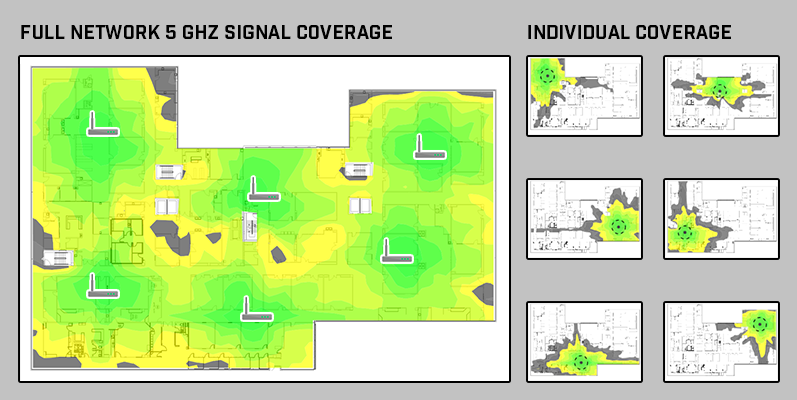
While there are many things that can affect wireless local area network (WLAN) operation, the placement of wireless access points (AP) can be one of the most significant factors in performance. Good AP placement must provide not only adequate coverage for all clients on a network, but must also provide adequate throughput, good connectivity, and minimal interference.

With the increase in low power devices, such as tablets and cell phones, and the increasing need for roaming service over nomadic use, efficient placement is critical to an operating wireless network. Poor placement of access points can result in numerous issues including low data rates, signal bleeding, bad roaming coverage, and even overspending on additional APs.

Read More [fa icon="long-arrow-right"]

WiFi as a Service (Waas) Pricing

[fa icon="calendar'] Mar 1, 2018 4:05:04 PM / by Blog Team posted in WiFi

[fa icon="comment"] 0 Comments

WiFi as a Service (WaaS), or managed WiFi, can be priced many different ways. Before getting into pricing models, it helps to review the cost elements of any project. All WiFi projects have four cost elements: labor, materials, other direct costs (ODC), and travel.

Read More [fa icon="long-arrow-right"]

BridgeChecker – Automatically Toggle Multiple Network Interfaces

[fa icon="calendar'] Feb 12, 2018 2:07:29 PM / by Blog Team posted in WiFi

[fa icon="comment"] 0 Comments

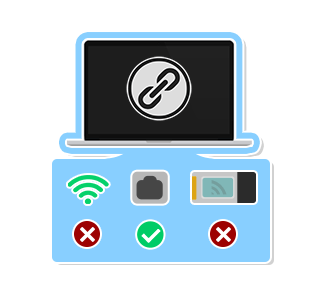
With it’s simple yet immense utility, BridgeChecker software allows organizations a robust and easy to deploy endpoint security solution. Whether your organization is based in one office, multiple locations, or in-house plus a remote workforce, our software gives your already overwhelmed IT staff and not so tech savvy or perhaps even forgetful/extremely busy and on the go end users a much more relaxed and serene mindset knowing their desktop, laptop, etc. is running BridgeChecker

Read More [fa icon="long-arrow-right"]

WiFi Design: 10 Things to Think About Before Meeting with Your WiFi Consultant

[fa icon="calendar'] Jan 5, 2018 5:04:20 PM / by Blog Team posted in WiFi

[fa icon="comment"] 0 Comments

A WiFi project begins with finding a consultant to help with the initial design process. The first meeting can be a phone call or an email, and it is used to obtain a better understanding of the requirements and constraints of a project. In order for the meeting to be as effective as possible, think about the following things before contacting your WiFi consultant.


Use a WiFi design checklist to help you prepare for building, restoring, or updating a wireless network.

Read More [fa icon="long-arrow-right"]

WiFi Network Design Considerations

[fa icon="calendar'] Dec 22, 2017 2:46:00 PM / by Blog Team posted in WiFi

[fa icon="comment"] 0 Comments

Implementing a new wireless network takes a lot of planning (WiFi Design Guide). In order to complete the network design phase, the following factors should be taken into consideration and thoroughly planned out. 

  1. Size of Physical Location
  2. Intended Use of the Wireless Network
  3. Number of Wireless Devices
  4. Wireless Client Device Capabilities
  5. The Environment
  6. Performance Expectations
  7. Bring Your Own Device (BYOD) Acceptance
  8. Building Age and Construction Materials
  9. Network Infrastructure Devices
Read More [fa icon="long-arrow-right"]

Basic Hardware Required for a Wireless Network

[fa icon="calendar'] Dec 15, 2017 5:12:25 PM / by Blog Team posted in WiFi

[fa icon="comment"] 0 Comments

Below is a list of the basic hardware required for a business class WiFi network. Typically, these networks require management of many access points. This requires specialized equipment for management and security beyond what is needed in a typical residential/home network. 

For more information about what is required for a wireless network, check out our WiFi Design Guide.

Read More [fa icon="long-arrow-right"]

How to Physically Locate a Rogue Access Point

[fa icon="calendar'] Dec 1, 2017 9:53:05 AM / by Blog Team posted in WiFi

[fa icon="comment"] 0 Comments

Rogue Access Points (APs) can be set up innocently or with malicious intent.  They can cause interference with your WiFi network, present vulnerabilities to security, and have devices on your network connect to it instead.  Whether it's a part of WiFi Health Checks or security analysis and monitoring, it's always a good idea to know how to physically locate these rogue Access Points.  

Read More [fa icon="long-arrow-right"]

Types of WiFi Surveys: Active vs. Passive

[fa icon="calendar'] Nov 21, 2017 9:56:05 AM / by Blog Team posted in WiFi

[fa icon="comment"] 0 Comments

Active WiFi Survey

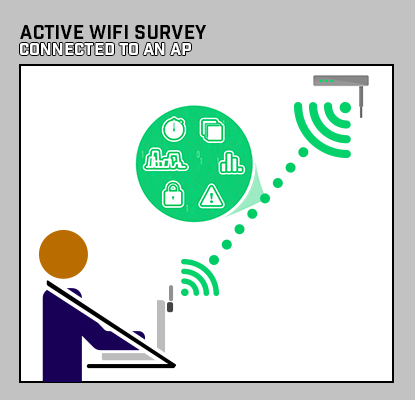
An active WiFi survey is when a surveying device is connected to the WiFi network and records signal measurements based on the performance of the connection. Active surveys are used to troubleshoot WiFi networks. This type of survey also allows for various other metrics to be measured, such as ping round-trip-time (RTT), throughput using iPerf/iPerf2/iPerf3, and Internet upload/downloads.

Read More [fa icon="long-arrow-right"]

WiFi Health Check Survey

[fa icon="calendar'] Nov 17, 2017 10:57:12 AM / by Blog Team posted in WiFi

[fa icon="comment"] 0 Comments

Vital signs are measurements of the body's most basic functions. When a body is not performing well, vital signs, such as body temperature, pulse rate, respiration rate, and blood pressure, are used to monitor and detect potential medical problems.

Similarly, if your WiFi network is not performing well, the following “vital signs” can be checked to determine the health of a WiFi network.

  • Signal Coverage
  • Signal-to-Noise Ratio
  • Channel Overlap
  • Rogues and Interferers
  • Access Point Placement Optimization


Need Help with Your WiFi?

Read More [fa icon="long-arrow-right"]

Wireless / WiFi as a Service (WaaS) Introduction

[fa icon="calendar'] Jul 19, 2017 5:44:13 PM / by Blog Team posted in WiFi

[fa icon="comment"] 0 Comments

Back in the late 1990s we called outsourced management of customer owned or leased equipment a managed network service (MNS). The scope of these MNS projects could range from just remote management and monitoring of routers to full turnkey design, installation, and management of all IT assets (routers, switches, servers, firewalls, etc.).


Read More [fa icon="long-arrow-right"]

Subscribe to Email Updates

DOWNLOAD TRIAL Windows WiFi Scanner