Wireless infrastructure is at an inflection point. WiFi 6E — the first standard to unlock the uncongested 6 GHz band — only finished its enterprise rollout in 2022, and already WiFi 7 (IEEE 802.11be) access points are hitting the market. For IT managers facing budget cycles, refresh schedules, and user expectations that never slow down, the question is sharp: do you ride out your WiFi 6E investment, or plan your next procurement around WiFi 7?
This guide cuts through the marketing noise and gives you what you actually need — a spec-level comparison, real deployment considerations, and a clear framework for deciding which standard belongs in your next capital plan.
A Quick Primer: What Is WiFi 6E?
WiFi 6E is an extension of WiFi 6 (802.11ax) that adds access to the 6 GHz band (5.925–7.125 GHz), which the FCC opened in the US in 2020. The core technology is identical to WiFi 6 — OFDMA, MU-MIMO, Target Wake Time, BSS Coloring — but the 6 GHz band adds 59 additional non-overlapping channels including fourteen 80 MHz and seven 160 MHz channels. That is a dramatic reduction in RF congestion compared to the crowded 5 GHz band.
For enterprise deployments, this translates to predictable high throughput in dense environments: conference rooms, auditoriums, open-plan offices with hundreds of concurrent devices. The 6 GHz band is also exclusively WiFi 6E/7 capable — older legacy devices cannot interfere with it, which is a meaningful operational benefit in mixed-device environments.
What Is WiFi 7 and What Makes It Different?
WiFi 7 (IEEE 802.11be) is the first standard designed from the ground up for multi-gigabit, ultra-low-latency wireless. Three innovations define it:
1. Multi-Link Operation (MLO)
This is WiFi 7's headline feature and a genuine architectural shift. MLO allows a device to simultaneously transmit and receive across multiple bands at once — for example, a laptop might bond 5 GHz and 6 GHz channels together into a single logical connection. The result is higher aggregate throughput, dramatic latency reduction (as low as 1–2 ms), and automatic traffic steering away from congested bands. For IT managers supporting real-time collaboration tools, cloud-hosted VDI, or manufacturing floor OT traffic, MLO is the feature worth watching.
2. 320 MHz Channels
WiFi 6E topped out at 160 MHz. WiFi 7 doubles that to 320 MHz in the 6 GHz band, roughly doubling available bandwidth for compatible clients. This is where the theoretical 46 Gbps headline number comes from — though real-world deployments will sit far below that ceiling.
3. 4096-QAM (4K-QAM)
Higher-order modulation packs more data into each transmission. WiFi 6E used 1024-QAM; WiFi 7 uses 4096-QAM, delivering approximately 20% more throughput per stream under favorable RF conditions. This benefit is most visible at close range with strong signal.
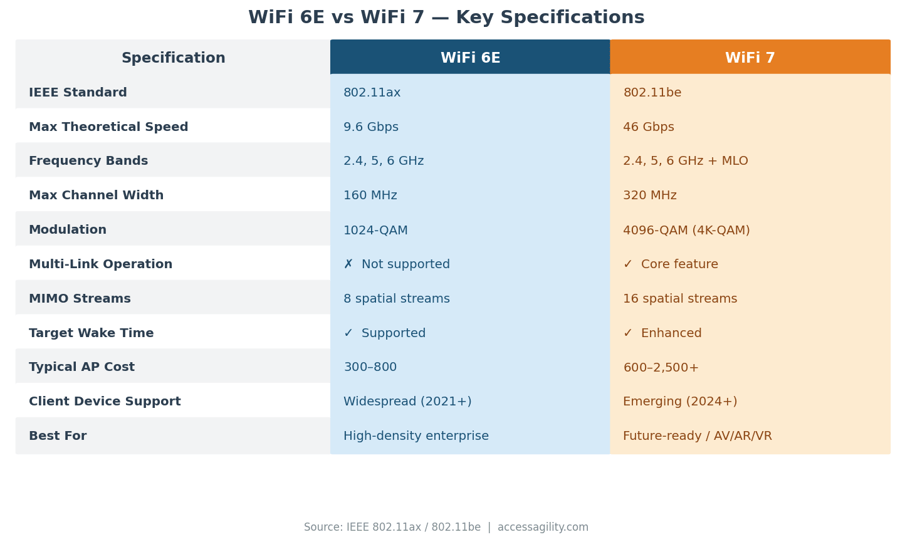
Key specifications compared. WiFi 7 APs are backward compatible with WiFi 6E clients.
Frequency Bands: What Opens Up With Each Standard
Both WiFi 6E and WiFi 7 operate across the 2.4, 5, and 6 GHz bands. WiFi 7 adds Multi-Link Operation on top — allowing devices to use multiple bands simultaneously rather than one at a time. The practical takeaway: your APs serve all three bands simultaneously. Legacy devices continue using 2.4 and 5 GHz without interruption. You are not replacing legacy support — you are adding capacity on top of it.
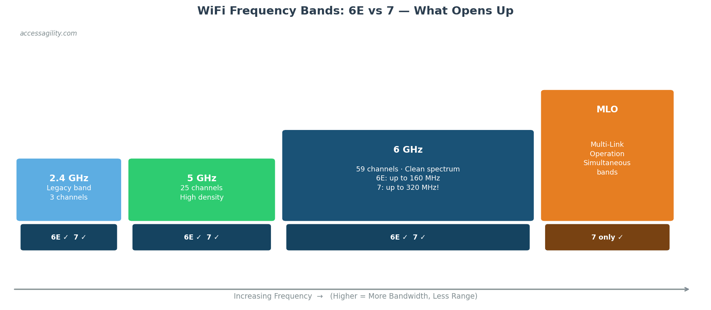
WiFi 7 adds Multi-Link Operation (MLO), allowing simultaneous use of multiple bands — a feature unique to 802.11be.
Real-World Throughput: Where the Numbers Land
Theoretical peak speeds make for good press releases. What actually matters for infrastructure decisions is aggregate throughput per AP under realistic load — a dense office at 9:00 AM, a packed auditorium, or a warehouse floor mixing WMS scanners with staff tablets.
For most enterprise use cases today — knowledge workers, video conferencing, cloud SaaS — WiFi 6E is already more than sufficient. WiFi 7's headroom becomes meaningful specifically for latency-sensitive applications and high-density media environments like AR/VR, broadcast studios, and real-time OT environments.
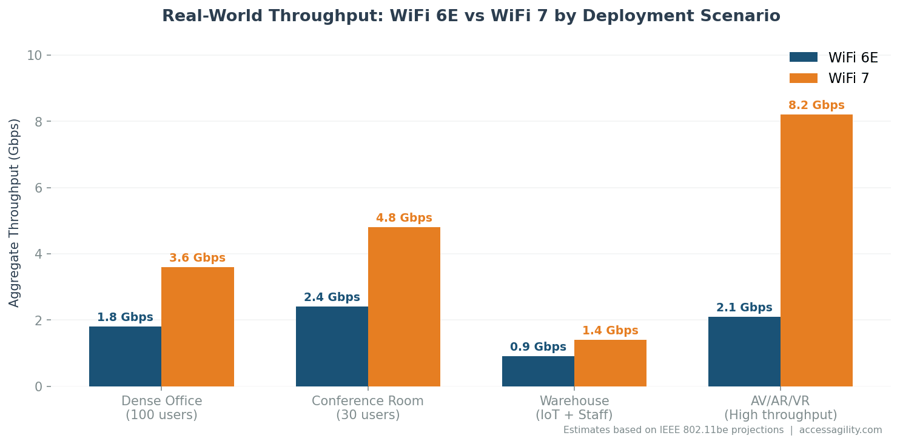
Projected aggregate throughput by scenario. AV/AR/VR environments see the largest benefit from WiFi 7's 320 MHz channels and MLO.
Deployment Considerations for IT Managers
AP Hardware Cost
Enterprise WiFi 6E APs currently range from $300–$800 per unit. WiFi 7 APs are entering the market at $600–$2,500+ depending on vendor and feature tier. For a 50-AP deployment, that is a cost delta of $15,000–$85,000 — a number that warrants scrutiny against your actual use case requirements.
Client Device Readiness
WiFi 7 client support is emerging but not yet widespread. As of 2025, WiFi 7 is available in select high-end laptops (Intel Meteor Lake and later), flagship Android devices, and Apple silicon Macs. If your device fleet is on a 3–5 year refresh cycle, most clients will not support WiFi 7 until 2026–2027. An infrastructure-first WiFi 7 deployment today means paying a premium for capabilities your endpoints cannot yet use.
Network Infrastructure (Uplinks)
WiFi 7's throughput increases create upstream bottlenecks if your switching infrastructure is not ready. High-density WiFi 7 deployments should be paired with:
- Multi-gig (2.5G / 5G) PoE switch ports — a single WiFi 7 AP can easily saturate a 1G uplink under MLO load
- PoE++ (802.3bt) switches — tri-band WiFi 7 APs draw more power than 802.3at can provide
- Core switching capacity review — verify your distribution and core switches are not creating aggregate bottlenecks
RF Site Survey — More Critical Than Ever
The wider 320 MHz channels in WiFi 7 are more sensitive to RF interference than narrower channels. A predictive RF design and post-deployment validation survey is not optional for WiFi 7. Tools like AccessAgility WiFi Scanner let you characterize your existing RF environment before a refresh — identifying interference sources, channel utilization, and RSSI coverage gaps — exactly the baseline data needed for a WiFi 7 channel plan.
WiFi 6E vs WiFi 7: Which Should You Deploy?
Choose WiFi 6E if:
- You are mid-cycle on a refresh and need to act now
- Your primary use cases are standard enterprise productivity (email, video calls, SaaS)
- Your client fleet is 2020–2023 vintage — they will not benefit from WiFi 7
- Budget constraints favor proven technology at lower cost per AP
- Your switching infrastructure is currently 1G PoE
Plan for WiFi 7 if:
- You are starting a greenfield deployment with a 5–7 year horizon
- You support latency-sensitive workloads: real-time OT, AR/VR, trading, broadcast
- Your device fleet will include WiFi 7 endpoints by 2026
- You are deploying in a high-density environment where MLO's congestion management is a clear win
- You have already budgeted to upgrade to multi-gig PoE switching
For most organizations in 2025–2026, the pragmatic answer is: finish your WiFi 6E refresh and start requiring WiFi 7 capability in your next procurement specification. WiFi 7 APs are backward compatible — a WiFi 7 AP purchased today serves your 6E and WiFi 6 devices without compromise while positioning you for full WiFi 7 capability as your client fleet matures.
How AccessAgility Can Help
Whether you are validating a WiFi 6E deployment or designing your first WiFi 7 network, AccessAgility provides the tools and services to get it right:
- WiFi Scanner for Windows — Scan and analyze your RF environment with full 6 GHz band visibility, channel utilization, and RSSI mapping.
- Professional WiFi Design & Survey Services — Predictive design, site survey validation, and post-deployment testing for enterprise and government environments.
- Optifi Network Monitoring — Continuous performance monitoring with threshold alerting and historical trending.